The problem

When something goes wrong airside or landside, every minute counts.

An airport has hundreds of operational points that need constant attention — security checkpoints, gates, baggage belts, borders, lounges, parking. When a queue builds or a belt stops, the old process runs over radio and shouting. Information gets lost, terminal and airside teams see different pictures, and after the disruption there is no usable record.

Queues escalate before anyone reacts
Missed escalations, no clear ownership
Terminal, airside and landside teams out of sync
No data to plan staffing from
No audit trail for regulators and SLA reporting
Shift handovers lost in verbal exchange
Features

One structured, shared information layer — across the entire airport.

Prefer to click through it yourself? Take the interactive tour
01 · Live overview

Your whole operation, at a glance.

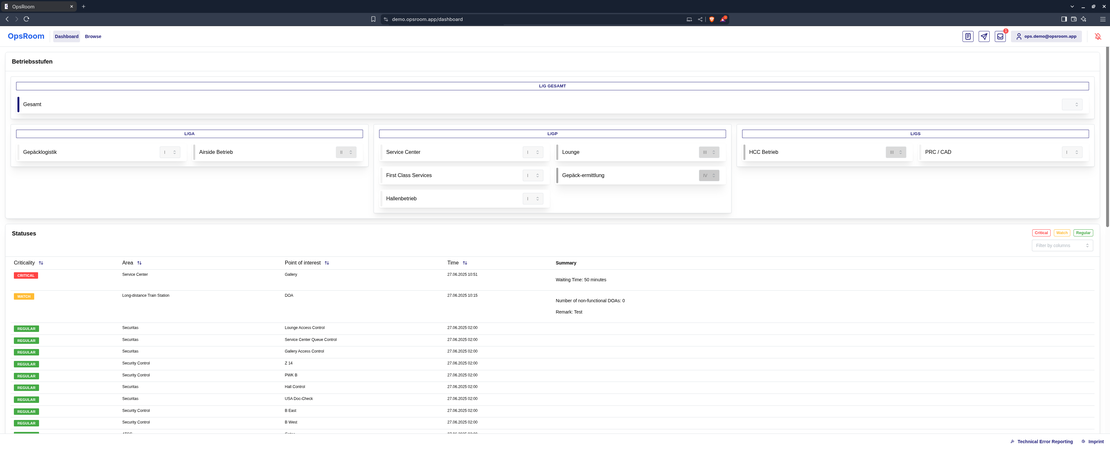
A live dashboard shows the status of every point of interest across terminals, airside and landside. Color-coded criticality levels make it instantly obvious where attention is needed — with no manual refresh.

  • Real-time updates over WebSocket — no polling, no refresh
  • Optional map view based on real terminal floor plans
  • Filter by criticality, tags and favorites
dashboard — live overview
02 · Structured reporting

Report incidents — structured, not free text.

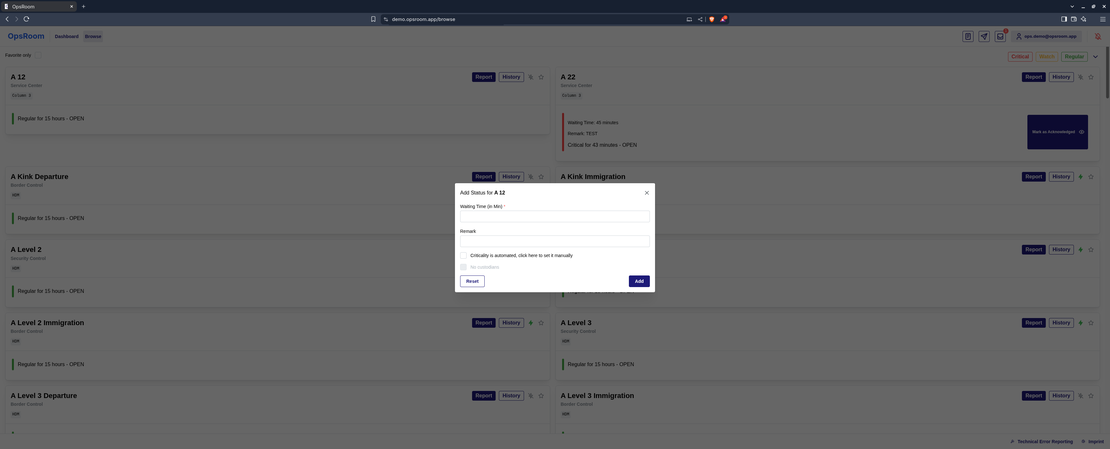
Any authorized person opens an incident straight from the app, on desktop or mobile. Each point type — checkpoint, gate, belt, lounge — has its own form capturing exactly the right data — who, what, how critical, when. Automatically.

  • Report forms configurable per point type
  • Carryover fields persist relevant data from the previous report
  • Reporter, time and severity captured automatically
report — structured form
03 · Workflow & collaboration

Every incident follows a clear process.

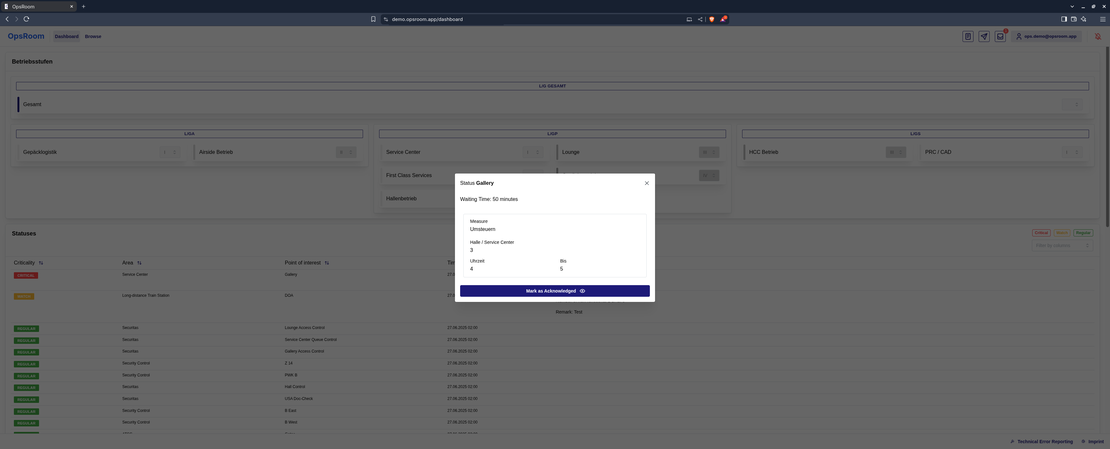
Incidents move through a configurable workflow from report to resolution. The system enforces the process — and everyone documents the measure underway right on the incident. Comments replace radio chatter with a searchable record.

  • Role-based workflow steps (e.g. Reported → In Progress → Resolved)
  • Documented measures — who is doing what, since when
  • Timestamped, attributed comments per incident
incident — workflow & measures
04 · Sensors & automation

Data reports itself — and escalates automatically.

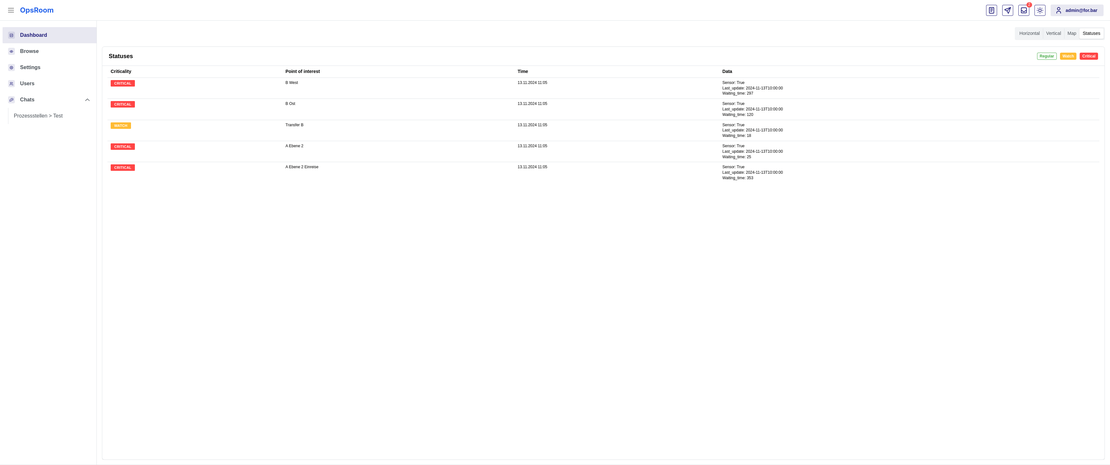
OpsRoom connects to external sensor systems and updates points with no human input. At a major European hub airport, security-checkpoint waiting-time sensors feed in this way. Severity is calculated automatically via an expression language — consistent instead of guesswork.

  • Pull (scheduled polling) and Push (external systems deliver directly)
  • Watchdog flags any sensor that goes silent
  • Automatic criticality via CEL rules — e.g. waiting time > 20 min → critical
sensor-fed point of interest
05 · Operating levels

The airport’s overall state — on one scale.

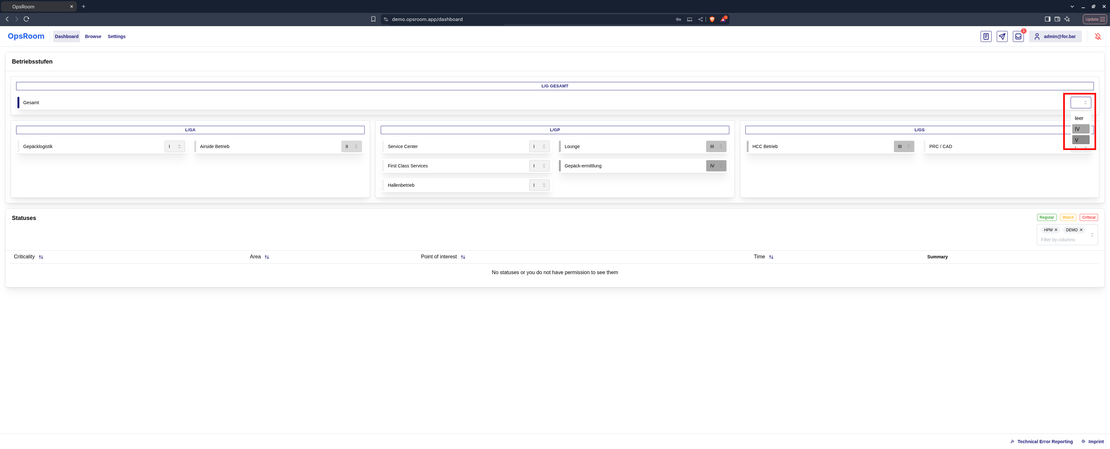
Operating levels capture the overall operational state (e.g. Normal → Elevated readiness → Emergency). Levels can be set airport-wide or per area — a terminal, airside, baggage — and can trigger notifications, visibility changes or documented reasons.

  • Airport-wide readiness indicator
  • Bulk or per-area control
  • Operating groups organize staff by function and zone
operating levels — airport-wide
06 · Operational news

Targeted announcements — to the right teams.

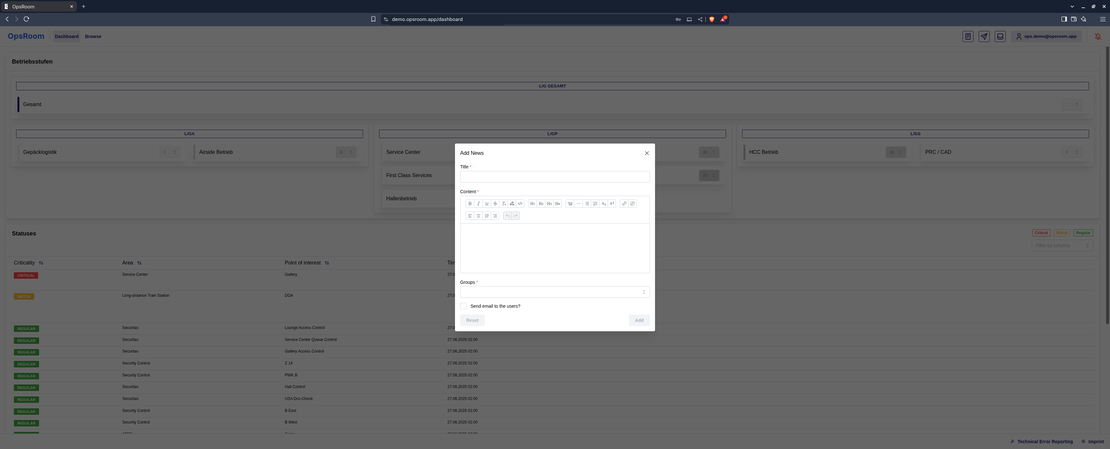
Operators publish news in a rich-text editor and control who sees it through groups — security only, everyone, or a single terminal team. With full history, searchable after the event.

  • Formatted text and links in the editor
  • Visibility controlled by group assignment
  • Push and email delivery to subscribers
news — targeted broadcast
07 · Mobile in the field

For teams on the apron and in the terminal — on their phones.

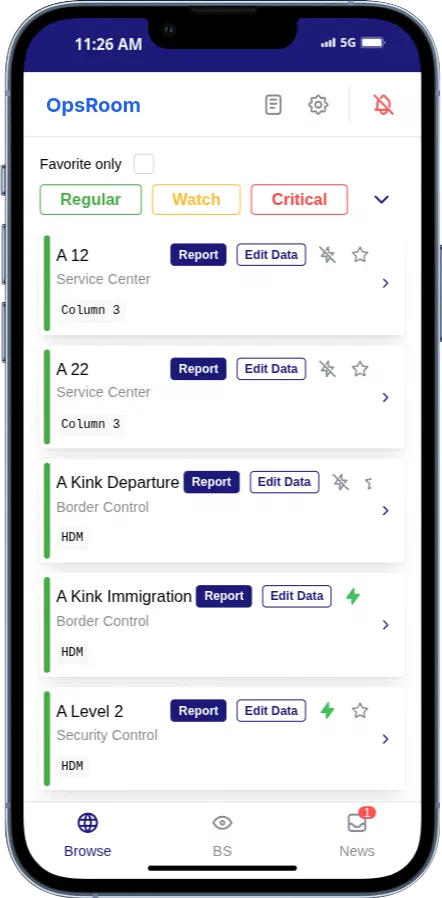
A dedicated mobile view, streamlined for fast reporting and status checks without the full desktop dashboard. Installable as a Progressive Web App on Android and iOS — all real-time updates and notifications included.

  • Installable as an app, no app store
  • Browse, report and operating levels on the go
  • Browser push straight to the affected point
mobile — installable PWA
What OpsRoom replaces ──Before / With OpsRoom
Before
Radio and walkie-talkie calls
Verbal status updates between terminal and airside
“Who's handling this?”
Manual checkpoint-queue monitoring
No record of what happened during the disruption
Escalation by gut feel
With OpsRoom
A structured real-time feed, visible to everyone at once
Timestamped, attributed, searchable incident records
Assigned custodians and documented measures on every incident
Sensor integration with automatic escalation
A full audit trail — every change, comment and measure
Automatic criticality rules for consistent escalation
What the old way costs

Radio chatter has a price tag.

Every incident coordinated over radio, phone and status-chasing burns staff time. Estimate what that costs at your airport — with your own numbers.

Staff hours spent on coordination per year
h
Coordination cost per year
What staying with radio and chasing status costs — every month
Even a conservative 30 % reduction with one shared live picture saves
Model my airport in a demo

Illustrative estimate based entirely on your inputs — no data leaves your browser. We'll gladly model your real case in a demo.

Where it fits

Built for airports first.

Every operational area of the airport, in one shared picture.

Security & border

Security checkpoints, border-control queues, document checks, access-control points

Terminals & gates

Gates, boarding queues, check-in rows, information desks, lounges, transfer points

Baggage

Baggage belts, claim carousels, sorting facilities, oversize-baggage counters, tracing desks

Airside operations

Aprons, stands, de-icing pads, ground-handling equipment, follow-me operations

Landside & access

Parking levels, taxi ranks, drop-off zones, rail and bus stations, forecourt flows

Beyond airports

The same engine runs stadiums, malls, expo centers, hospital campuses and theme parks

Technical highlights

Web-based, real-time, API-first — and admin-configurable.

01

Real-time over WebSocket

Every update is pushed instantly to every connected client.

02

API-first

Integrates with existing sensors, AODB feeds, building management systems and data feeds.

03

CEL expression logic

Criticality, reset conditions and templates editable without developers.

04

Roles & row-level security

Fine-grained access per user, group and individual point — enforced server-side.

05

Push & email

Browser push to owners, emails to custodians, reminders on inactivity.

06

Audit-safe

Incidents and news are soft-deleted — never permanently erased, with a full change history.

07

Analytics & reporting

Incidents, dwell times and measure effectiveness for review and staffing.

08

Configurable templates

Report, measure and reset templates in the hands of operations managers.

Pricing

Start free. Scale with your operation.

OpsRoom is available as SaaS — hosted in the EU, nothing to install, up and running in days. On-premises deployment available for Enterprise. Most airports start with Team.

Starter
Free
forever

For small teams that want to replace the radio-and-paper routine.

  • Up to 5 users
  • 1 site, up to 25 points of interest
  • Live dashboard & mobile PWA
  • Structured incident reporting
  • Community support
Get started
Most popular
Team
€12
per user / month

Less than 30 minutes of staff time per user — per month.

For operations teams that need workflows, sensors and a full audit trail.

  • Everything in Starter
  • Unlimited points of interest
  • Configurable workflows & operating levels
  • Sensor integration & automatic escalation
  • Full audit trail & analytics
  • Email support
Start with Team
Enterprise
Custom
request an offer

For airports and multi-site operators with their own requirements.

  • Everything in Team
  • Multiple sites & unlimited users
  • Your branding, your domain
  • SSO / LDAP, roles & row-level security
  • On-premises or private cloud
  • SLA, onboarding & dedicated support
Get in touch

All prices excl. VAT. Hosted in the EU · Made in Germany.

FAQ

The questions operations managers ask us.

+ What is OpsRoom?

OpsRoom is a real-time operational management platform for airports, offered as SaaS. It gives operations teams one shared live picture of every operational point — security checkpoints, gates, baggage belts — with structured incident reporting, automatic sensor escalation and a full audit trail, on any device.

+ How fast can we go live?

Days, not months. OpsRoom is SaaS — there is nothing to install. We set up your points of interest, roles and workflows in a short workshop, and your team reports the first incidents the same week.

+ Is this another heavy AODB / A-CDM suite?

No. OpsRoom is the lightweight coordination layer on top of what you already run. It replaces radio calls, WhatsApp groups and paper logs — and connects to existing systems (sensors, AODB feeds, building management) through its API instead of replacing them.

+ What is OpsRoom not?

OpsRoom is not an AODB, not a flight-planning or staff-rostering system, and not a video-surveillance platform — and it doesn’t try to be. It is the coordination layer where people and sensors report what is happening and everyone sees the same picture. The systems you already run stay exactly where they are; OpsRoom connects to them.

+ Where is our data hosted — and is it safe?

In the EU, GDPR-compliant, made in Germany. Access is controlled per user, group and individual point — enforced server-side with row-level security. Every change is kept in a full audit trail; nothing is ever silently deleted. Enterprise customers can also run OpsRoom on-premises.

+ Do we need new sensors or hardware?

No. OpsRoom works from day one with people reporting on their phones. Sensor integration is optional — when you are ready, existing systems can push data in via the API and escalate automatically.

+ Will field staff actually use it?

That is what it is built for. The mobile app installs from the browser — no app store, no rollout project. Reporting an incident is a structured form with a handful of fields, faster than raising someone on the radio.

+ Does it work for smaller or regional airports?

Yes — the Starter tier is free for up to 5 users, and the platform scales from a single terminal to a multi-site operation. You only grow into the paid tiers when your operation does.

+ What does it cost?

Starter is free forever. Team is €12 per user per month. Enterprise — multiple sites, SSO, on-premises, your branding — is a custom offer. See the pricing section above or just get in touch.

+ Can we run it under our own brand?

Yes. Name, logo, colors, favicon and fonts are configurable per deployment — Enterprise customers run OpsRoom fully white-labeled on their own domain. A major European hub airport does exactly that today.
Get started

See OpsRoom at your airport.

We’ll show you in a short demo how OpsRoom turns your operation into one shared, real-time picture — tailored to your checkpoints, gates, belts, roles and processes.

  • 30-minute live demo, along your own use cases
  • No installation, no commitment — it's SaaS
  • An honest read on whether OpsRoom fits your operation
Request a demo